
Docs / Connect tools
Mistral Studio / Le Chat
Connect TokenSaver as a custom MCP connector in Mistral Vibe (Le Chat) or Studio Build. Hosted tools server over OAuth 2.1 — governed chat, catalogue, usage, cache, RAG inventory.
- Mistral Studio / Le Chat
- MCP OAuth 2.1
- mcp.tokensaver.fr
- TokenSaver tools
What you connect
- MCP URL (Component A — tools):
https://mcp.tokensaver.fr/mcp— not the gateway, not the bare host - Scope:
mcp:tools(connector scope for Mistral Le Chat) - Pivot API key: created at consent — label Mistral MCP (Settings → API keys / MCP OAuth sessions)
Authentication
Prefer OAuth 2.1 (Dynamic Client Registration). Bearer ts_… works in the Connectors Debugger for smoke tests, but Studio “Create” is designed around OAuth.
| Field | Value |
|---|---|
| Server URL | https://mcp.tokensaver.fr/mcp |
| Auth method | OAuth 2.1 |
| OAuth client ID | mistral (platform catalogue) |
| OAuth client secret | From DCR (POST /api/v1/oauth/register) — not your ts_… key |
| Studio redirect URI | https://callback.mistral.ai/v1/integrations_auth/oauth2_callback |
| Debugger redirect URI | https://console.mistral.ai/build/connectors/debugger/oauth-callback |
Steps — Le Chat (recommended)
- Open chat.mistral.ai → Connectors
- Custom MCP Connector → name like
tokensaver(alphanumeric,_/-only) - Server URL
https://mcp.tokensaver.fr/mcp→ Connect (OAuth auto-detect) - Authorize on TokenSaver console → pivot key « Mistral MCP » → Return to Mistral
- Confirm tools appear in Work / Chat
Steps — Studio Build « Créer »
- Studio → Connectors → Custom MCP → same URL
- Auth OAuth 2.1 → advanced: Client ID
mistral, secret from DCR below - Prefer running the Connectors Debugger first (OAuth 2.0, empty client fields for DCR) — Debugger OK ≠ Create OK if redirect allowlist is wrong
Fetch OAuth client secret (DCR)
curl -sS -X POST https://api.tokensaver.fr/api/v1/oauth/register \
  -H "Content-Type: application/json" \
  -d '{
    "client_name": "MistralStudio",
    "grant_types": ["authorization_code", "refresh_token"],
    "token_endpoint_auth_method": "client_secret_basic",
    "response_types": ["code"],
    "redirect_uris": [
      "https://callback.mistral.ai/v1/integrations_auth/oauth2_callback"
    ]
  }'
# → client_id "mistral" + client_secret (stable)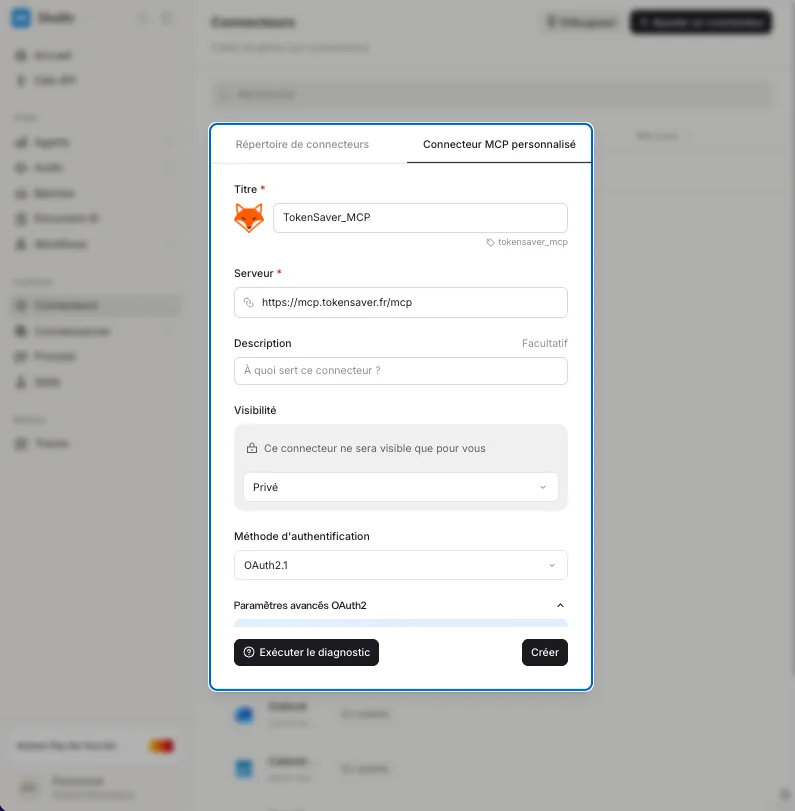
Deep dive: MCP introduction · Tools server · API keys & auth.